

Some months, money just gets away from you. A card balance you haven’t looked at in a while. A charge you don’t recognize. That low hum of worry every time you tap your card, exactly what a financial reset checklist is built to catch.
You don’t need a new app or a complete life overhaul to fix that. You need one weekend, a laptop, and a plan for what to do in what order.
This checklist splits the work across Friday night, Saturday and Sunday. By Sunday evening you’ll know every balance, have cut the obvious leaks, and have a simple plan for the next 30 days.
Do you need a reset?
Here are nine signs it’s time. If three or more sound familiar, block off this weekend.
- Unknown card balance. You’re not sure what you owe right now.
- Unopened bills. Mail piles up because you avoid it.
- Mystery charges. Subscriptions you forgot signing up for.
- Late fees. You’ve paid at least one this year.
- Money runs out early. You’re short days before payday.
- Balance dread. You avoid checking your account.
- Old holiday debt. You’re still paying off last year’s gifts.
- No cushion. One car repair would go on a card.
- Where did it go? You can’t name your top 3 expenses.
Noticing the signs is the first step. The reset is the second.
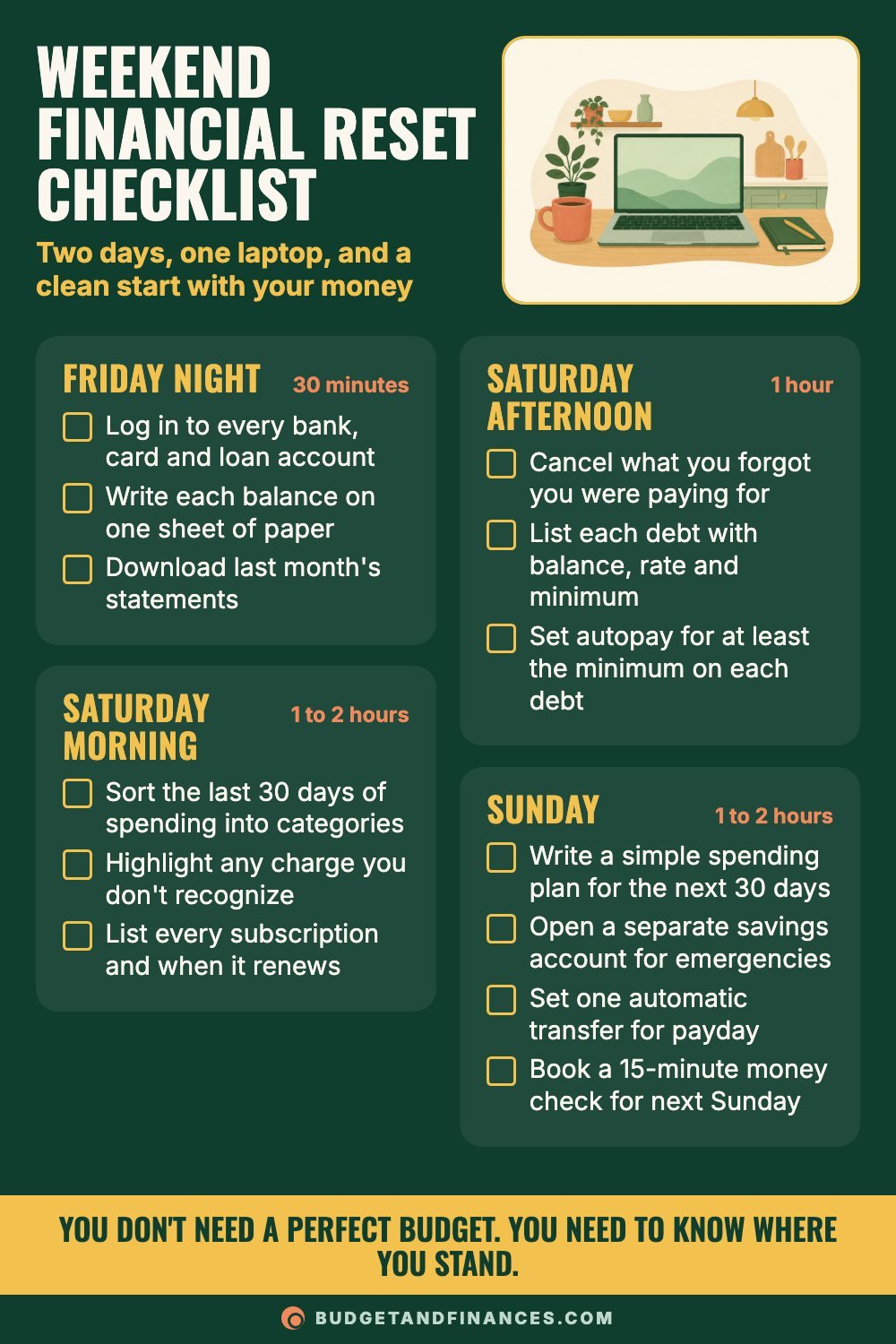
The weekend financial reset checklist
Plan on roughly five to six hours total, spread out so no single sitting is a slog.
Friday night: gather the numbers (30 minutes)
- Log in to every bank, card and loan account.
- Write each balance on one sheet of paper.
- Download last month’s statements.
That’s it for Friday. Don’t analyze anything yet. The goal is to get every number out of hiding and onto one page. If you have old passwords to reset, this is the night to deal with them, so Saturday isn’t spent clicking “forgot password.”
Use the account snapshot (below) for this. One row per account: the name, the type, the balance, the interest rate and the due date.
Saturday morning: see where the money went (1 to 2 hours)
- Sort the last 30 days of spending into categories.
- Highlight any charge you don’t recognize.
- List every subscription and when it renews.
Keep the categories simple: housing, food, transportation, bills, debt payments, fun, and “other.” You’re looking for the shape of your spending, not perfect accounting.
Pull the real numbers from your statements. Your memory is kinder than your bank statement, and guessing is how plans end up wrong from day one.
Saturday afternoon: cut leaks and organize debt (1 hour)
- Cancel what you forgot you were paying for.
- List each debt with balance, rate and minimum.
- Set autopay for at least the minimum on each debt.
Autopay on the minimums is a safety net. It stops late fees while you decide on a bigger payoff plan. You can always pay more by hand.
For any charge you highlighted that you truly don’t recognize, contact the card issuer or bank. It may be a renamed subscription, or it may be fraud. Either way, you want to know.
Sunday: build the plan (1 to 2 hours)
- Write a simple spending plan for the next 30 days.
- Open a separate savings account for emergencies.
- Set one automatic transfer for payday.
- Book a 15-minute money check for next Sunday.
Your spending plan only needs to cover the next 30 days. Start with your take-home pay, subtract the bills that are fixed, then give the rest a job: groceries, gas, a small amount of fun money, and whatever you can send to savings.
The automatic transfer can be small. What matters is that some money moves to savings on payday without you deciding each time.
A worked example: filling in the account snapshot
Here’s a sample snapshot so you can see how it comes together. These are made-up numbers for illustration.
| Account | Type | Balance | Rate | Due date |
|---|---|---|---|---|
| Everyday checking | Checking | $640 | none | none |
| Card A | Credit card | $2,300 | 24% | the 12th |
| Card B | Credit card | $850 | 19% | the 20th |
| Car loan | Loan | $9,400 | 7% | the 3rd |
Total owed: $2,300 + $850 + $9,400 = $12,550.
Total saved: $0 so far.
On Saturday, this person finds three subscriptions they forgot about: $15, $11 and $9 a month. That’s $35 a month, or $35 x 12 = $420 a year. Canceling all three frees up $35 a month for the new emergency savings account.
On Sunday, they set a $35 automatic transfer on payday. It’s a small start, but the account now exists, it has a name, and money goes into it without a decision.
The two card balances are the ones to focus on later, since they carry the highest rates. For now, autopay covers the minimums on all three debts, so nothing is late.
After the reset: your first 30 days
The reset takes a weekend. The habit takes a month. Here’s how to keep it going past Monday.
Week 1: track every purchase (days 1 to 7)
- Write down each purchase the same day.
- Compare spending to your plan on Sunday.
A notes app or a paper list both work. Same-day tracking is the point, because a week-old receipt is hard to remember.
Week 2: trim one category (days 8 to 14)
- Pick the category that ran over most.
- Set a weekly limit for just that one.
One category only. If eating out ran over, give it a weekly number and leave everything else alone for now.
Week 3: start the cushion (days 15 to 21)
- Move any leftover money to savings.
- Work toward a $1,000 starter emergency fund.
A $1,000 starter fund is a common first goal. It won’t cover everything, but it can keep a flat tire or a copay off a credit card.
Week 4: review and adjust (days 22 to 30)
- Compare the plan to what really happened.
- Change the amounts for next month.
- Put your next reset date on the calendar.
Your first plan will be off somewhere. That’s normal. Adjusting the numbers is part of the process, and month two is always easier than month one.
Get the free printable
The printable version has the full weekend checklist with time estimates, plus the blank account snapshot with room for 12 accounts, total owed and total saved.
Common mistakes
Fixing everything at once. Pick the three biggest money leaks this weekend. The rest can wait until next month.
Guessing instead of checking. Pull the real numbers before you plan. Estimates tend to leave out the small, frequent charges.
A budget with no fun money. A plan with zero room for treats tends to break by week two. Give yourself a small amount.
Forgetting yearly bills. Car registration, gifts and annual fees still count. Divide each by 12 and set that aside. A $240 yearly fee is $20 a month.
Leaving your partner out. If you share bills, reset together. Surprises cause more fights than the numbers do.
No follow-up date. Before you close the laptop, schedule a 15-minute check-in for next weekend.
Small and finished beats big and abandoned.
FAQ
How long does a financial reset take?
About five to six hours spread over a weekend: 30 minutes Friday, two to three hours Saturday, and one to two hours Sunday. If you have a lot of accounts, Saturday morning may run longer.
What if I can’t face looking at my balances?
Start with just Friday night. Writing numbers on a page is easier than it sounds once you begin, and knowing the real number is usually less stressful than wondering. Nobody else has to see the sheet.
Should I pay off debt or save first after a reset?
A common order is to set autopay for the minimums, build a $1,000 starter emergency fund, then put extra money toward high-interest debt. The small cushion helps stop new card debt when something unexpected comes up.
How often should I do a full reset?
A full weekend reset is useful when things feel out of control, or once or twice a year as a deep clean. In between, a 15-minute weekly check and a short monthly review keep things from drifting.
Do I need a budgeting app?
No. A sheet of paper, a spreadsheet or a budgeting app all work. The best tool is the one you’ll actually open next Sunday.
You don’t need a perfect budget. You need to know where you stand. This is general education, not personal financial advice.