
The holidays don’t usually wreck a budget with one big purchase. They wreck it with dozens of small ones spread across two months, paid with three different cards, some online and some in a store, the kind of spending a holiday spending tracker is built to catch.
By the time January statements show up, nobody remembers what added up to that total.
A holiday spending tracker fixes that by putting every purchase in one place as it happens. What gets written down gets noticed. This guide covers the two sheets that work together, the hidden costs to include, and a 15-minute weekly check-in from November to New Year’s.
The two sheets that work together
You need two simple tools: one to plan and one to log.
The holiday budget planner sheet
This is the plan. At the top, write the season and the money you’ve set aside. Then list your categories with four columns:
- Category: gifts, food, travel, wrapping and so on
- Planned: what you intend to spend
- Actual: what you really spent, filled in as the season goes
- Difference: planned minus actual
The difference column is where next year’s plan gets smarter. A category that runs over two years in a row needs a bigger number.
The holiday spending tracker
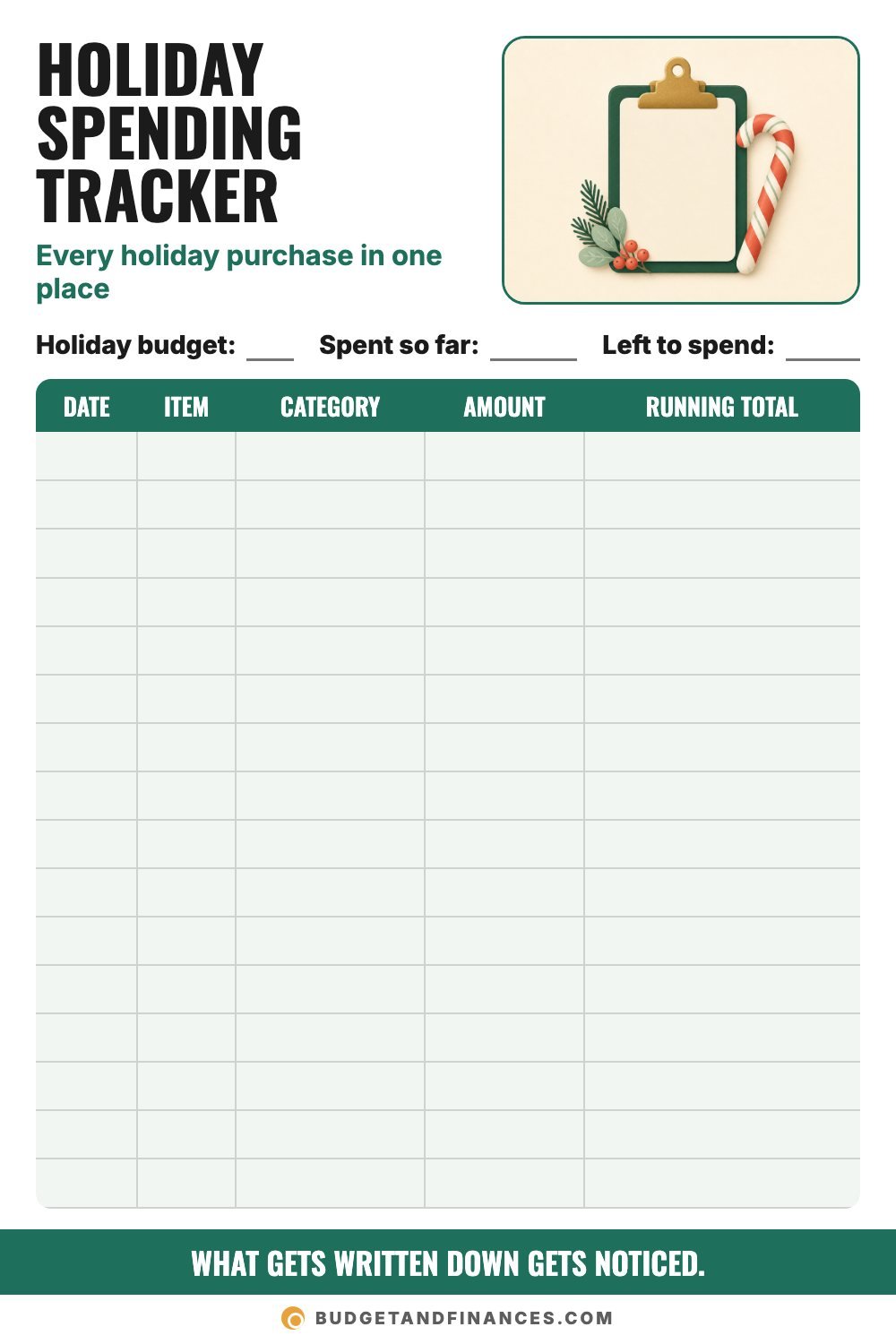
This is the daily log. At the top: your holiday budget, spent so far and left to spend. Below, every purchase gets a row:
- Date
- Item
- Category (matching your planner)
- Amount
- Running total
The running total is the key column. It tells you where you stand after every purchase, not only at the end of the month.
Step 1: Plan categories, including the hidden costs
Before the first purchase, fill in the planner. Most people remember gifts and food. The small stuff is what quietly blows the budget, so give it a line before it shows up.
Here are nine hidden holiday costs to check for:
- Wrapping supplies: paper, tape, bags, tags and bows
- Shipping: mailing gifts to faraway family
- Cards and stamps: adds up with a long card list
- Hostess gifts: something for every party you attend
- Party outfits: new clothes for events and photos
- Teacher gifts: plus class parties and school events
- Extra groceries: baking, guests and holiday meals
- Thank-you gifts: sitters, carriers and service helpers
- Travel and gas: driving to see family and to events
How many were in your budget last year? You don’t need a separate line for each. You can group a few, like wrapping with cards and shipping. The point is that every one of them lives somewhere in the plan.
Step 2: Set the total first
Write your holiday budget at the top of the tracker before you buy anything. Without a number at the top, the running total has nothing to be compared against.
Pick a total you can pay in cash, based on what you’ve already saved and what you can set aside before the shopping starts.
Step 3: Log every purchase the same day
This is where most trackers fail. The plan is fine. The logging stops.
A few habits keep it going:
Log it the same day. Enter purchases at night or snap a photo of each receipt. A week later, you’ll forget half of them.
Count online orders when you order. Log them when you click buy, not when the box arrives. Otherwise the total looks lower than it really is for days.
Include the small stuff. Tape, stamps and coffee while shopping all belong on the list. They’re exactly the costs that disappear otherwise.
Check it before you buy. Look at the amount left before any unplanned purchase. That one glance stops a lot of “sure, why not” spending.
Log returns too. Subtract refunds so your running total stays honest. Write the refund as a negative amount on the day it posts.
A tracker you check weekly beats a perfect one you ignore.
Step 4: Do a 15-minute weekly check-in
Once a week from November to New Year’s, sit down with the tracker for about 15 minutes.
Every week
- Add up this week’s holiday spending.
- Compare it to the amount left.
- Enter any receipts you missed.
Before the next purchase
Ask three questions:
- Is it on the list?
- Is there money left in that category?
- Can it wait 24 hours?
If you’re over
- Move money from a category with room.
- Cut one outing or one gift upgrade.
- Don’t cover the gap with a credit card.
After the holidays
- Total the whole season.
- Write down what surprised you.
- Start saving monthly for next season.
Check in weekly and January won’t hold any surprises.
Worked example: an $800 holiday season
Here’s how the two sheets look for an example household with an $800 holiday budget.
The first week of the tracker
| Date | Item | Category | Amount | Running total |
|---|---|---|---|---|
| Nov 3 | Gift for oldest child | Gifts | $45 | $45 |
| Nov 3 | Tape and gift tags | Wrapping and cards | $7 | $52 |
| Nov 5 | Online order, board game | Gifts | $28 | $80 |
| Nov 8 | Coffee while shopping | Food | $5 | $85 |
| Nov 9 | Refund for returned sweater | Gifts | −$20 | $65 |
At the weekly check-in, they’ve spent $65 and have $800 − $65 = $735 left.
Notice the coffee and the refund. Both are small, and both change the total. Leaving them off would make the tracker wrong within the first week.
The planner at the end of the season
| Category | Planned | Actual | Difference |
|---|---|---|---|
| Gifts | $400 | $430 | −$30 |
| Food | $150 | $165 | −$15 |
| Travel and gas | $60 | $55 | $5 |
| Wrapping and cards | $40 | $48 | −$8 |
| Teacher and thank-you gifts | $40 | $35 | $5 |
| Hostess gifts and parties | $30 | $45 | −$15 |
| Giving | $40 | $40 | $0 |
| Buffer | $40 | $0 | $40 |
| Total | $800 | $818 | −$18 |
The buffer absorbed most of the overspending, and the season finished $18 over the plan. That’s close, and it wasn’t a shock, because the weekly check-ins showed it coming.
The difference column shows what to change next year. Gifts and hostess gifts both ran over, so next year’s plan should give them more room, or set firmer limits. Travel came in under, so a little can move from there.
Free printable: holiday spending tracker and planner sheet
You get both sheets. The spending tracker has your holiday budget, spent so far and left to spend at the top, with 16 rows for date, item, category, amount and running total. The planner sheet has 12 rows for category, planned, actual and difference.
Print a few copies of the tracker. A busy season can fill more than one page.
Common mistakes
Starting the tracker after shopping starts. Early purchases in October or on sale weekends are easy to forget. Start the log with your first holiday purchase.
Logging only the big items. The small costs are the reason people go over. Log everything.
Forgetting purchases on different cards. If you shop with more than one card or account, check each one at the weekly check-in.
Ignoring returns. A refund you don’t log makes you think you have less money left than you do, and a return you forget to make wastes it.
Throwing it away in January. The finished planner is the best tool for next year’s budget. Keep it.
FAQ
What should a holiday spending tracker include?
At minimum: your total budget at the top, and a row for every purchase with the date, item, category, amount and running total. A separate planner sheet with planned and actual amounts per category makes it even more useful.
When should I start tracking holiday spending?
With your first holiday purchase. For many families that’s early November, but if you pick up gifts on sale earlier, start the log then.
Should I track holiday spending separately from my regular budget?
It helps. Keeping holiday purchases on their own sheet makes it easy to see the season’s total. Just make sure the holiday money is also set aside in your regular budget, so it isn’t counted twice.
How do I track purchases made with a credit card?
Log them on the day you buy, just like cash. The tracker shows what you spent, not when the bill is due. Then pay the card from the holiday money you set aside.
What if I go over budget?
Move money from a category with room, cut one planned outing or gift upgrade, and don’t cover the gap with a credit card. Then note it in the difference column so next year’s plan is more realistic.