
Subscriptions are designed to be forgettable. You sign up once, the charge is small, and it renews quietly for months or years, until a subscription audit finally catches it.
The problem is the math. A $4.99 app doesn’t feel like much. Multiply it by 12 and add three more charges, and you’re looking at hundreds of dollars a year for things you may barely use.
A subscription audit fixes this in one afternoon. You find every recurring charge, do the yearly math, decide what stays, and cancel the rest the same day.
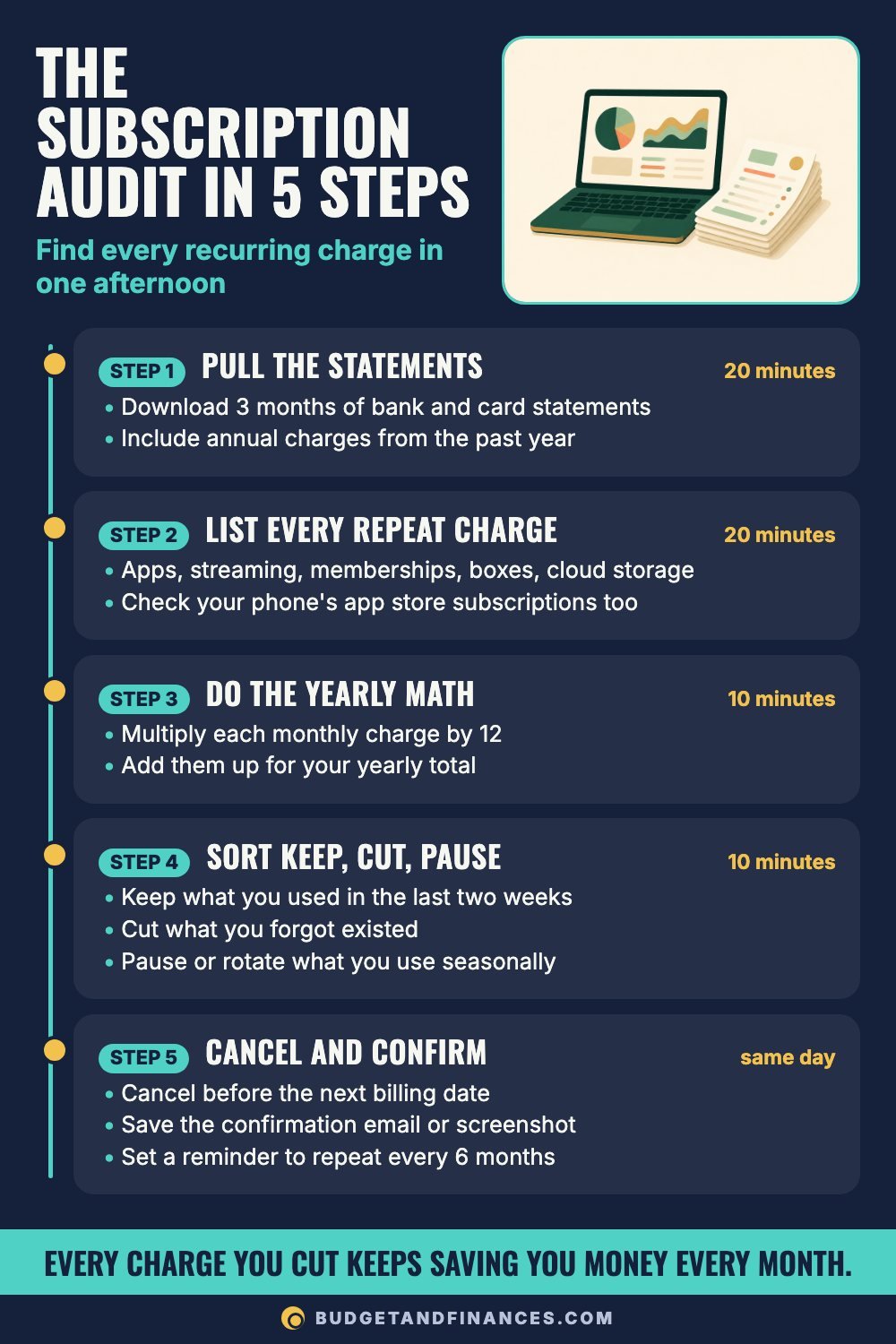
Step 1: Pull the statements (20 minutes)
Download the last 3 months of statements for every bank account and credit card you have. Three months catches most monthly and quarterly charges.
Then go back further for annual charges. Scan the past 12 months for anything that shows up once a year, like a membership, a software plan or cloud storage. Annual renewals are the easiest ones to forget because you only see them once.
Step 2: List every repeat charge (20 minutes)
Write down every charge that repeats: apps, streaming, memberships, subscription boxes and cloud storage. Include the cost and the renewal date.
Your bank statement is only the start. Subscriptions hide in at least nine places, so check each one before you call the list done.
Where subscriptions hide
- Bank statement: look for the same charge each month.
- Every credit card: including the one you rarely carry.
- Phone app store: in-app subscriptions bill here, and they’re managed in your phone’s account settings.
- Email inbox: search “receipt” and “renewal.”
- Phone bill: add-ons and extra lines you may not use.
- Shopping accounts: memberships and auto-ship orders.
- Cloud storage: extra space you may not need.
- Annual renewals: check 12 months back, not just 1.
- Payment apps: saved payments set to repeat.
One missed spot can keep charging you for years, so be thorough here. This is the step that makes the audit work.
Step 3: Do the yearly math (10 minutes)
Multiply each monthly charge by 12. Then add them up for your yearly total.
This step matters because monthly prices are built to look small. Here’s what common price points cost over a year:
- $4.99 a month: $4.99 × 12 = $59.88 a year, for one small app you might open twice.
- $10.99 a month: $10.99 × 12 = $131.88 a year, for a single streaming service.
- $15 a month: $15 × 12 = $180 a year, for a membership you meant to use more.
- $30 a month: $30 × 12 = $360 a year, for a meal or snack box that piles up.
Add those four together and they come to $60.98 a month, or $731.76 a year.
For annual charges, the yearly cost is simply the charge. If you want to compare it to monthly ones, divide by 12.
Step 4: Sort into keep, cut or pause (10 minutes)
Go down your list and give every line one of three labels.
Keep what you used in the last two weeks.
Cut what you forgot existed.
Pause or rotate what you only use seasonally.
If you’re stuck on one, run it through this test.
Keep it if
- You used it in the last two weeks.
- It replaces something that costs more.
- You’d pay for it again today if you were signing up fresh.
- Everyone in the house uses it.
- It’s already the cheapest tier you need.
Cancel it if
- You forgot you were paying for it.
- You kept it for one show or one feature.
- Another service covers the same thing.
- You feel guilty when you see the charge.
- You only use it a few months a year.
When in doubt, cancel. You can almost always sign up again later if you miss it.
Try rotating streaming
Keep one streaming service at a time. Watch what you wanted, cancel, then switch to the next one. You still get the shows, just not all at once.
Step 5: Cancel and confirm (same day)
Don’t leave the cancellations for “later this week.” Do them while the list is in front of you.
- Cancel before the next billing date. Many services keep access until the end of the period you already paid for, but check the terms.
- Save the confirmation email or a screenshot. If a charge shows up again, you have proof.
- Set a reminder to repeat the audit every 6 months. New subscriptions and free trials creep back in.
For free trials, set a calendar reminder a few days before the trial ends, the same day you sign up.
Check shared and family plans
If you share a plan with family or friends, find out who’s paying and who’s still using it. Sometimes one person keeps paying for a family plan long after the others have stopped using it. And if two people in your house pay for the same service separately, one plan may cover you both.
Worked example: a four-subscription audit
Say your audit turns up exactly the four charges from Step 3. Here’s how the sort might go.
| Subscription | Cost | Yearly | Keep or cut |
|---|---|---|---|
| Small app | $4.99 | $59.88 | Cut: opened twice |
| Streaming service | $10.99 | $131.88 | Keep: used this week |
| Membership | $15.00 | $180.00 | Cut: forgot it existed |
| Snack box | $30.00 | $360.00 | Pause: boxes piling up |
Starting total: $4.99 + $10.99 + $15.00 + $30.00 = $60.98 a month, or $731.76 a year.
After the audit: only the streaming service stays active, at $10.99 a month.
Monthly difference: $60.98 − $10.99 = $49.99 a month.
Yearly difference: $49.99 × 12 = $599.88 a year, as long as the paused box stays paused.
Those numbers come from these four sample charges. Your own list will have different ones, so do the math on your real statements.
Get the free Subscription Tracker
The tracker puts every recurring charge on one page, with columns for the subscription, cost, renewal date and keep or cut. There’s a spot at the top for the date you reviewed it and your monthly total. If it renews automatically, it belongs on this list.
Common mistakes
Only checking one account. The card you rarely carry, your phone’s app store and payment apps are where forgotten charges tend to hide.
Only looking back one month. Annual renewals won’t show up. Go back 12 months for those.
Canceling the same day it renews. Some services bill early in the day. Cancel a few days ahead of the renewal date when you can.
Not saving proof. Keep the confirmation email or a screenshot until you’ve seen that the next billing date passed without a charge.
Doing it once. Put the 6-month reminder on your calendar before you close your statements.
FAQ
How often should I do a subscription audit?
Every 6 months works well. It’s often enough to catch free trials that turned into charges, and rare enough that it doesn’t feel like a chore.
What if I can’t figure out what a charge is?
Search the name on your statement in your email inbox, since most services send a receipt. If you still can’t identify it, call the number on the back of the card and ask your bank or card issuer.
Should I switch to annual plans to save money?
An annual plan can cost less than 12 monthly payments, but only if you’ll use it all year. Divide the annual price by 12 and compare it to the monthly price, then ask yourself honestly whether you’ll still be using it in month ten.
What’s the difference between pausing and canceling?
Some services let you pause billing for a set time and keep your account settings. That’s useful for things you use seasonally. Just put a reminder on your calendar for when the pause ends, because billing usually restarts on its own.
Is it worth canceling a $4.99 subscription?
If you don’t use it, yes. $4.99 × 12 = $59.88 a year, and it takes a few minutes to cancel.